
Nine mistakes account for most rejected or delayed structural and civil submissions, and every one of them is preventable before you click “submit” on CORENET X. Reviewers at BCA and partner agencies do not interpret intent. They flag ambiguity, missing signatures, and mismatched documents on sight.
- BIM/IFC model does not match 2D plans. Sync your model and drawings before packaging, and confirm the coordinated IFC file, not the PDF, reflects the latest design.
- Missing QP declarations or Accredited Checker forms. Confirm every required signature and endorsement is attached before file lock.
- Wrong document tags in the submission portal. Match each file to its correct module; a mistagged 3D model routes nowhere.
- Oversized or unencrypted files. Compress and encrypt per CORENET X specification before upload.
- Unsigned or incomplete calculation books. Route calculations through the QP for sign-off ahead of the deadline, not the night before.
- Poor coordination between disciplines. Hold a final cross-check between architectural, structural, and M&E leads.
- Version control gaps after late-stage revisions. Reissue and re-date every affected sheet, not just the ones that changed.
- Missing stamps or authentication. Verify every plan sheet carries the licensed professional’s stamp and signature.
Pro Tip: Run your file list against BCA’s structural plan submission requirements and SS555 before you touch the upload button. Aectechnicalsg builds this cross-check into every submission package it prepares.
Key Takeaways
Most rejected civil engineering submissions fail because of documentation and coordination gaps, not flawed engineering, and nearly all of them are preventable with a structured pre-submission QA process.
| Point | Details |
|---|---|
| Sync the model first | The coordinated IFC model overrules 2D plans in review, so update it before packaging. |
| Confirm every signature | QP declarations, calculation books, and AC certificates all need current, dated sign-off. |
| Tag files correctly | Match each document to its exact portal module to avoid automated routing rejections. |
| Processing takes 10 to 20 working days | Clean first submissions clear faster than resubmissions triggered by written directions. |
| Get expert coordination | Aectechnicalsg manages QP/PE endorsement, AC coordination, and IFC audits across URA, BCA, SCDF, JTC, LTA, PUB, and NEA. |
Table of Contents
- Why Common Civil Engineering CDP Submission Errors Delay Approvals
- Fixing BIM/IFC Model and Coordination Errors
- Fixing Portal, Tagging, and File-Packaging Errors
- The Documentation Checklist Reviewers Expect
- When You Need an Accredited Checker (And How Long Approval Takes)
- A Pre-Submission QA Checklist Your Team Can Actually Run
- What to Do When a Submission Comes Back
- Why Submission Errors Are Rarely Technical
- How Aectechnicalsg Helps You Submit It Right the First Time
- Sources
Why Common Civil Engineering CDP Submission Errors Delay Approvals
Reviewers don’t guess. They see a mismatch between your IFC model and your 2D plan, or a missing certificate, and they issue a written direction rather than approve with an assumption. That single step can add weeks.
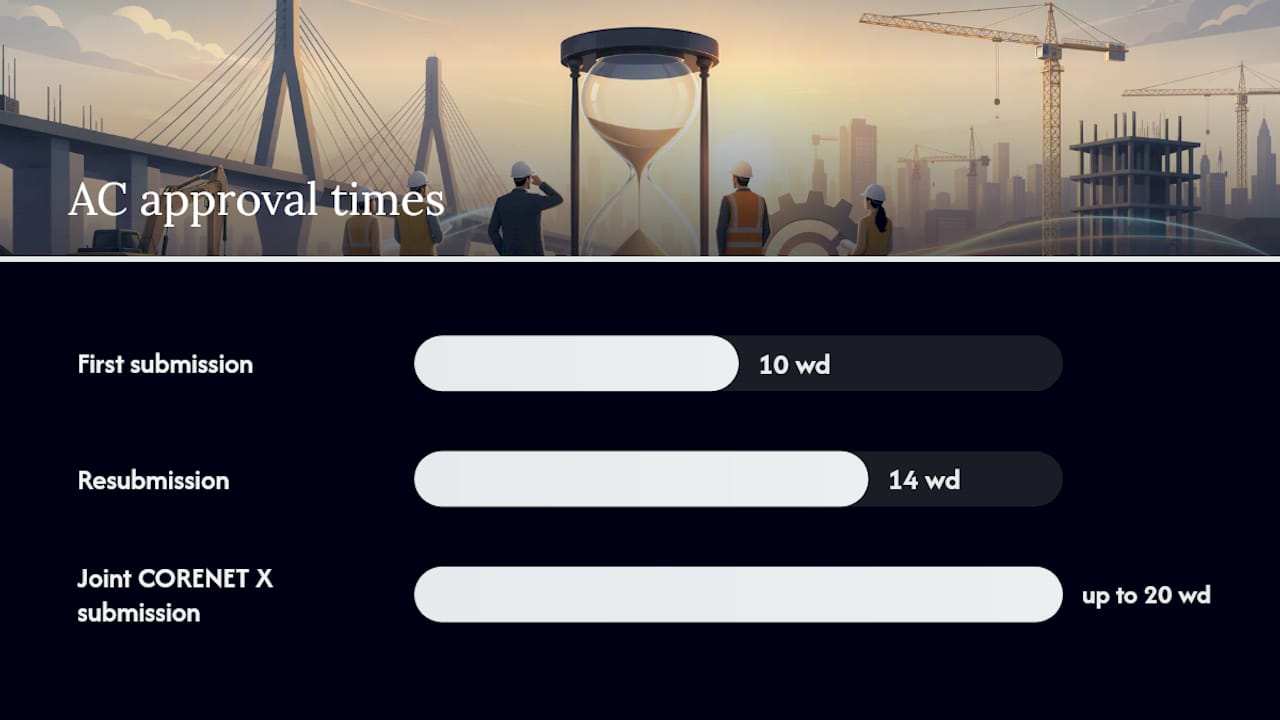
BCA’s own guidance shows accredited-checker submissions run 10 working days for a first submission and 14 for resubmissions, while joint CORENET X submissions take up to 20 working days when everything is filed correctly. Poor-quality first submissions rarely hit those windows.
- Extended review cycles stack on top of design and construction schedules that were never built to absorb them.
- Written directions often trigger a full resubmission, not a quick clarification.
- Rework costs compound when structural, architectural, and M&E teams have to revisit sign-off after the fact.
- Site works can stall entirely if the permit that depends on the plan hasn’t cleared.
Fixing BIM/IFC Model and Coordination Errors
The coordinated IFC model, not the 2D plan, carries authority in a CORENET X review. Teams that treat the 2D set as the “real” document and the model as an afterthought consistently submit packages where the two disagree on dimensions, levels, or member sizes.
The recurring failure modes are specific: models that weren’t updated after a late design change, missing IFC parameter data that the portal expects to auto-populate fields, incorrect model segregation between disciplines, and previously approved elements left sitting in a model that has since moved on. Each one reads to a reviewer as a document that can’t be trusted.

Pro Tip: Large IFC files slow uploads and sometimes trigger portal size limits. Export a lightweight, segregated version per discipline rather than one bloated composite model, and confirm parameter fields populate correctly before you package the submission.
Run this before every submission:
- Confirm the IFC model reflects the current design revision, not last month’s.
- Check that every required IFC parameter field is populated, not left blank.
- Verify model segregation matches portal rules for structural, architectural, and M&E content.
- Strip out superseded or previously approved elements still lingering in the model.
- Cross-check model dimensions against the 2D plan sheet by sheet.
Fixing Portal, Tagging, and File-Packaging Errors
CORENET X routes your submission automatically based on the tags you assign, and a mistagged file goes nowhere useful. Tagging a structural model as a “Structural Plan” when the portal expects “Civil & Structural Model” causes routing errors or flat rejection, even when the underlying engineering is sound.
Teams also confuse the “Submission of Document” module with an actual approval pathway. That module isn’t connected to the approval workflow, so anything filed there simply sits, unreviewed, while your clock runs out.
- Match every file to its exact module and document tag before upload, not after a rejection notice.
- Follow the portal’s file-format and file-size limits; split or consolidate files exactly as the CORENET X rules specify.
- Encrypt IFC models and signed documents. Industry practice has the QP(Geo) and Accredited Checker pass encrypted models to the submitting QP to preserve accountability for what was actually reviewed.
- Use consistent, dated file names across revisions so a reviewer can tell which version they’re looking at.
Pro Tip: Name files by discipline, revision number, and date (e.g., “STR_Model_Rev3_2026-02-10”), then run a final packaging checklist confirming tags, formats, and encryption before the portal locks the submission.
The Documentation Checklist Reviewers Expect
Missing or incorrectly signed documents cause as many rejections as technical errors. BCA lists specific forms, including Form BCA-BE-STAPPV01, that must accompany a structural plan submission, along with signed plan sheets and calculation books carrying the QP’s endorsement.
Some items are mandatory on every submission. Others depend on project scale or risk category.
| Document | When Required | Common Fix |
|---|---|---|
| QP declaration | Every structural plan submission | Confirm signature and date match the current revision |
| Signed calculation book | Every submission with structural design | Route through QP for sign-off before packaging |
| Accredited Checker certificate | Category 2 and 3 buildings per BCA rules | Confirm AC has completed independent review, not just a checklist scan |
| LPS plan (large projects) | Required upfront for qualifying projects from April 1, 2026 | Prepare per SS555 and attach at Building Plan stage |
| Geotechnical report | Sites with soil or foundation risk factors | Confirm QP(Geo) endorsement is current |
A structural submission built around this table rarely gets bounced for a missing form.
When You Need an Accredited Checker (And How Long Approval Takes)
Category 2 and 3 buildings, generally larger or higher-risk structures, require Accredited Checker certification before BCA will process the structural plan. The AC doesn’t rubber-stamp the QP’s work; they run an independent structural analysis and issue their own certificate alongside a specialized checklist.
Processing windows reflect that extra layer. First submissions with AC certification clear in 10 working days, resubmissions in 14, and joint CORENET X submissions in up to 20 working days when documentation is complete. Missing AC material or a late sign-off doesn’t just delay the AC step; it resets the review clock entirely.
- Confirm which building category applies before design finalization, not at submission.
- Brief the AC early enough that their independent analysis doesn’t become the bottleneck.
- Keep a signed copy of the AC certificate on file before the QP submits.
A Pre-Submission QA Checklist Your Team Can Actually Run
The last 24 to 72 hours before submission is where most preventable errors get caught, or missed. Build this into your workflow every time:
- Sync architectural, structural, and M&E models and confirm no discipline is working from a stale file.
- Verify every signature, stamp, and certification is present and dated to the current revision.
- Confirm file packaging, naming, and portal tags match CORENET X requirements.
- Cross-check that approved plans link correctly to the permit sequence they’re meant to support.
- Log the submission in an audit trail before uploading.
| Action | Accountable Role |
|---|---|
| Model sync across disciplines | Project coordinator |
| Structural calculation sign-off | Qualified Person (QP) |
| Independent structural review | Accredited Checker (AC) |
| Geotechnical endorsement | QP(Geo) |
Pro Tip: Keep a dated audit trail of every file version and sign-off. If a reviewer questions a discrepancy weeks later, you want the paper trail ready, not reconstructed from memory.
What to Do When a Submission Comes Back
A returned plan isn’t a dead end if you move fast. Capture every reviewer comment verbatim, then isolate exactly which files or sheets are affected rather than reworking the whole package.
- Log each comment and match it to the specific document or model element it references.
- Correct only the affected plan sheets or calculation pages, then re-verify against the rest of the set.
- Get renewed AC or QP endorsement on anything that changed structurally.
- Resubmit with a one-page cover letter listing what changed, where, and who endorsed it.
- If a comment is ambiguous, use the agency’s pre-consultation channel before you guess and resubmit incorrectly.
Why Submission Errors Are Rarely Technical
Most rejected submissions I’ve seen trace back to project management, not engineering competence. A structural calculation is usually correct. The problem is that nobody synced the model after a late architectural change, or the M&E layout shifted without triggering a fresh coordination review.
The fix is organizational, not technical: mandatory pre-submission sign-off meetings, early integrated design reviews before drawings freeze, and one person accountable as submission coordinator. Give someone that job explicitly, and half of these errors disappear before they reach the portal.
How Aectechnicalsg Helps You Submit It Right the First Time
Aectechnicalsg is the alternative to assembling your submission package in-house and hoping the portal accepts it. Instead of your team learning CORENET X tagging rules through trial and rejection, Aectechnicalsg runs the pre-submission QA, QP and PE endorsement, and AC coordination as one managed process.
The team handles IFC model audits, file packaging to CORENET X specification, and rapid remediation if a submission comes back with a written direction. Aectechnicalsg supports authority submissions across URA, BCA, SCDF, JTC, LTA, PUB, and NEA, so the coordination between agencies happens before your file ever reaches a reviewer’s queue.
If your next submission involves PE endorsement or authority coordination, start with PE endorsement and authority submission support and get your package reviewed before it goes anywhere near CORENET X.
Sources
- Structural Plan submission | Building and Construction Authority
- Common mistakes and good practices when submitting CORENET X projects
- BCA industry sharing: BP/TOP regulatory updates (2025)